Overview
Use the powerful live streaming of YouTube Live or any prerecorded video from YouTube, Vimeo or hosted on your own server.
- Interact with your attendees by letting them ask questions and answer them during the webinar either in your video or with question and answer feature.
- Fully responsive pages so visitors can attend a webinar from every mobile device or tablet.
- Collect attendees’ name and email address and import them into your third party email provider.
- Fully customizable email reminders so your attendees so they don’t miss the webinar.
- Optional replays so attendees who missed the timeslot get a second chance.
FEATURES
- Organize live webinars with Hangouts on Air, Youtube or Vimeo (MP4 video files, iframes and RTMP streams are also available in the Pro version)
- Customize the styling of every webinar page
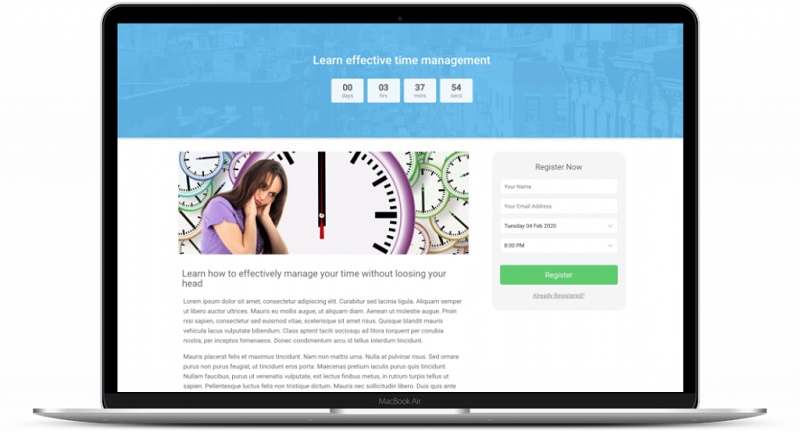
- Use shortcodes to place a registration or login form anywhere in your website
- Responsive / mobile friendly webinar pages
- Collect attendees name and email when they sign up
- Send automatic reminders and customize them to your needs
- Confirmation pages after signing up
- Countdown page to show before the event starts
- See how many people are online during your webinar
- Export attendees to text or CSV file
- Let attendees ask questions during the live event and keep a log of it
- Give away an incentive during your live webinar or replay
- Have a replay available for registrants that missed out on the webinar
- Works with almost any theme
PRO FEATURES
- Automated recorded webinars (Pro version)
- Recurring, evergreen, ‘just in time’ and ‘on demand’ webinars (Pro version)
- Custom registration fields (Pro version)
- Paid webinars (Pro version)
- Member webinars (Pro version)
- See the names of attendees during your webinar (Pro version)
- Live chat during webinars (Pro version)
- Let attendees raise their hand (Pro version)
- Show Call to Action elements during webinar (Pro version)
- Widgets with past and upcoming webinars (Pro version)
- Per webinar emails (Pro version)
- Custom registration pages (Pro version)
- Custom confirmation pages (Pro version)
- Automated replays (Pro version)
- Integration with WooCommerce (Pro version)
- Integration with WooCommerce Memberships (Pro version)
- Integration with Mailchimp (Pro version)
- Integration with Aweber (Pro version)
- Integration with ActiveCampaign (Pro version)
- Integration with Mailpoet 2 & 3(Pro version)
- Integration with Drip (Pro version)
- Integration with GetResponse (Pro version)
- Integration with Enormail (Pro version)
- Integration with Zapier (Pro version)
- Import & Export your webinar settings (Pro version)
- Let attendees import the webinar to their Outlook or Google calendar (Pro version)
& more functionalities and integrations are on its way!
You can find more information on the Pro version on our website: getwebinarpress.com
For more guides, information & documentation please go to our website: getwebinarpress.com
What's included
- The full pluginEvery file from the developer's release, in one zip.
- Unlimited sitesInstall it on your own and your clients' sites.
- GPL licensedFree to use, study and modify.
- No paymentFree to download, no card needed.
How to install
- 1Download the zip file from this page.
- 2In WordPress, go to Plugins → Add New → Upload Plugin.
- 3Choose the zip, click Install Now, then Activate.
Questions
Is this the developer's own release?
Yes. It is the release published by the original developer, redistributed under the GNU General Public License. The GPL allows anyone to share and resell the code.
Do I get a license key or automatic updates?
No. License keys, one-click updates and support come from the developer's own paid plans. To update, download the newer version here when it is listed and install it over the old one.
Can I use it on more than one site?
Yes. The GPL puts no limit on the number of sites, including client sites.
Why is it free?
During our launch every download that is available on GPL Store is free. Nothing is charged and no card is asked for.